Guides · Updated 24 Sep 2026
Holidays and working days on monday.com: where to add them
If your team works Sunday to Thursday, or takes ten public holidays a year, a count of calendar days overstates every delay. A request that arrived before a long weekend looks three days late when nobody was at work.
The short answer
monday.com has two places for holidays, both for team capacity: a work schedule in Administration, which its article says will only impact the Workload view and widget, and, in early release on Pro and Enterprise, a company time off schedule for each resource. For a count between two date columns, monday.com's WORKDAYS formula returns the working days between them by the account's work week. monday.com's articles do not say that a holiday entered in either place changes that count; a user's feature request in the monday.com community, marked Gathering Feedback, reports that WORKDAYS does not know holidays. For time in status and SLA targets, the calendar has to be applied to every status change, not only to two dates.
The WORKDAYS formula
In a Formula column, WORKDAYS takes two dates and returns the number of working days between them. The later date comes first: monday.com's list of formula functions writes it as WORKDAYS({TO_DATE}, {FROM_DATE}), and WORKDAY adds a number of working days to a date. It is the right tool for a one-off count, for example between a request date and a delivery date.
The gap is holidays. The community feature request asks for WORKDAYS to recognize holidays; until then, teams subtract a holiday count by hand, which has to be updated every year and for every country the team works in. The lists differ even inside one country: for 2026, gov.uk lists 8 bank holidays in England and Wales and 10 each in Scotland and Northern Ireland. The US Office of Personnel Management lists 11 federal holidays for 2026, with Independence Day observed on Friday 3 July because 4 July falls on a Saturday.
For a one-off count with public holidays left out, the free working days calculator takes two dates and a country.
Where monday.com lets you add holidays
- Work schedules. In Administration, a work schedule sets a team's weekly workdays and hours and can designate specific holidays or company-wide days off; the Administration article says it "will only impact the Workload view and widget". The same page sets the account weekend to Friday-Saturday or Saturday-Sunday.
- Company time off. The resource schedules article describes a separate company time off (holiday) schedule for each resource, on Pro and Enterprise, in early release.
- monday service. The SLA column counts time only in the working hours of the account's default schedule and pauses on non-working days; custom schedules are not taken into consideration. Its 24/7 option counts "nights, weekends, and holidays".
None of these articles says that a holiday entered there changes a Formula column's count.
Counting leave days
monday.com's resource schedules, in early release on Pro and Enterprise, log personal time off such as vacation for each person, visible in the Workload widget. monday.com's vacation tracker template tracks leave requests and notifies the employee when a request is approved or denied. For the number of days a request takes, the Formula Use Cases article uses a vacation request board as its WORKDAYS example: WORKDAYS({To},{From}) counts the working days by the account's work week. monday.com's articles do not say that WORKDAYS skips a public holiday inside the request, and the community feature request mentioned above reports that it does not, so check one request that spans a holiday. The WORKDAYS formula guide covers the edge cases to test.
Where the calendar matters most
- Time in status: days spent in a status across a holiday are not days anyone could work.
- SLA targets: a two-day target should mean two working days.
- Stale checks: an item is not forgotten because nobody touched it over a long weekend.
How Stale & SLA does it
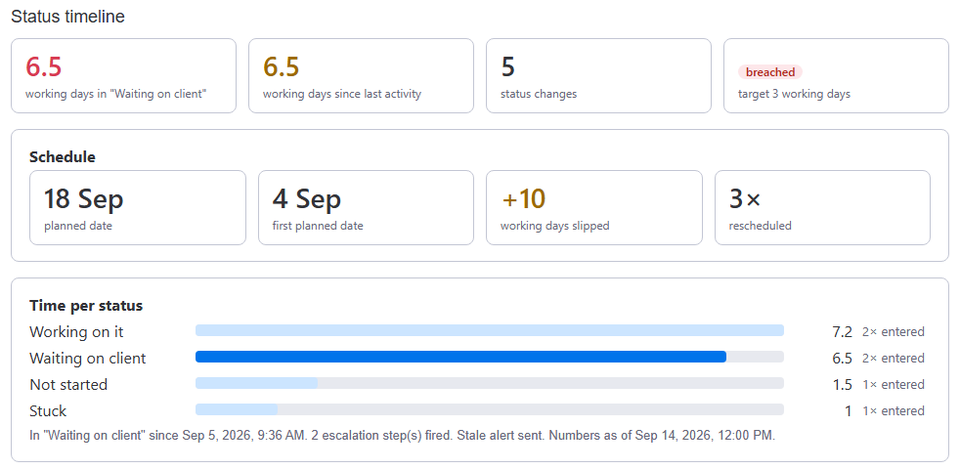
Each board can run on business hours: a time zone, the work days (Sunday to Thursday works as well as Monday to Friday), the working hours and a list of holidays. Every number the app writes then counts working time only: Days in current status, Days since last activity, the Total days per status, SLA targets and Days slipped.
Holidays are set per board, so a team in another country keeps its own list on its own boards. Account defaults let every new board start from the same calendar. Clock changes are handled too: working time stays exact across daylight-saving switches in any time zone.
Frequently asked
- Can two teams on one board have different calendars?
- Not on one board: the calendar belongs to the board. Give each team its own board, or use the calendar the board's owners work to.
- Does a holiday stop the SLA clock?
- Yes. With business hours on, a holiday is no working time at all.
- What about a half day?
- Working hours are the same every work day. List a half day as a holiday if nobody works on it, or leave it as a full day.
Stale & SLA adds time in status, stale alerts, SLA targets and escalations to any monday.com board. Set-up is one status column and a Save on each board.
Stale & SLA is in review for the monday.com Marketplace. Until monday.com approves the listing, the install screen says the app has not been reviewed yet. How it handles your data.