Guides · Updated 24 Sep 2026
How to track time in status on monday.com
Time in status is how long an item spends in each stage: three days in Working on it, five in Waiting on client, one in Review. It is the quickest way to see where work waits.
The short answer
monday.com records every status change in an item's activity log, but it does not add those changes up, so the number is not on the board. You can stamp dates with automations and subtract them in a formula, or use an app that reads the activity log and writes the time into numbers columns.
The do-it-yourself way, and where it drifts
The usual build is a date column per status, an automation that stamps the date when the status changes, and a formula that subtracts dates. It works for one status on one board. Then it drifts:
- An item that returns to a status overwrites its date, so the first visit is lost.
- Items that existed before the automation have no dates at all.
- Weekends and holidays count as waiting time unless the formula removes them.
What to measure
- Days in the current status: how long the item has been where it is now.
- Total time per status: every visit added up, so an item that bounced between Review and Working on it three times shows its real total.
- Days since last activity: how long since anyone touched the item at all, which catches forgotten items that never change status.
How Stale & SLA does it
Stale & SLA reads the board's activity log and writes the answers into ordinary numbers columns: Days in current status and Days since last activity on every item, and a Total days in <status> column for each status you choose to track. Because they are numbers columns, you can sum them by group, chart them on a dashboard and filter on them.
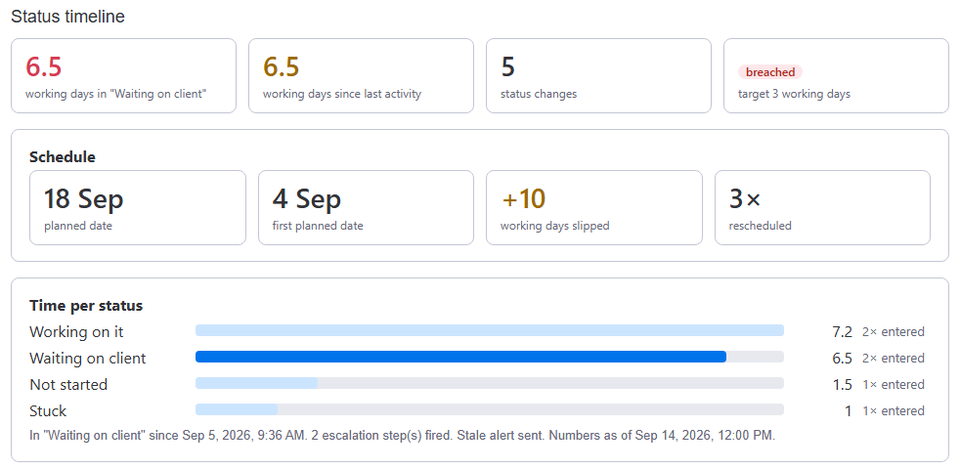
The history comes from the activity log, so items that existed before you installed the app get their numbers too. With business hours on, time counts in working days of the board's calendar, and the holidays you list do not count. The Status timeline item view shows one item's path, status by status.
Frequently asked
- Does it count weekends?
- Only if you want it to. In calendar mode every day counts. With business hours on, only the work days and hours of the board's calendar count, minus its holidays.
- What if an item goes back to a status?
- Each visit is added to that status's total, and Days in current status starts again from the new visit.
- Does it change my other columns?
- No. It writes only the numbers columns it creates. If a numbers column with exactly one of its titles already exists, it uses that one.
Stale & SLA adds time in status, stale alerts, SLA targets and escalations to any monday.com board. Set-up takes about two minutes per board.