Guides · Updated 24 Sep 2026
Time tracking vs. time in status on monday.com
They sound alike and answer different questions. Time tracking is how long a person worked on an item. Time in status is how long the item sat in each stage, whether anyone was working on it or not.
The short answer
Use the Time Tracking column for effort: billable hours, estimates against actuals. Use time in status for flow: how long requests wait before someone picks them up, and which stage is the bottleneck. Most teams that ask where the time goes need the second.
The Time Tracking column
monday.com's Time Tracking column is a start/stop timer on each item. It is the right tool for billable hours and effort estimates. It depends on people pressing start and stop, and it says nothing about the days an item waits between those sessions.
Time in status
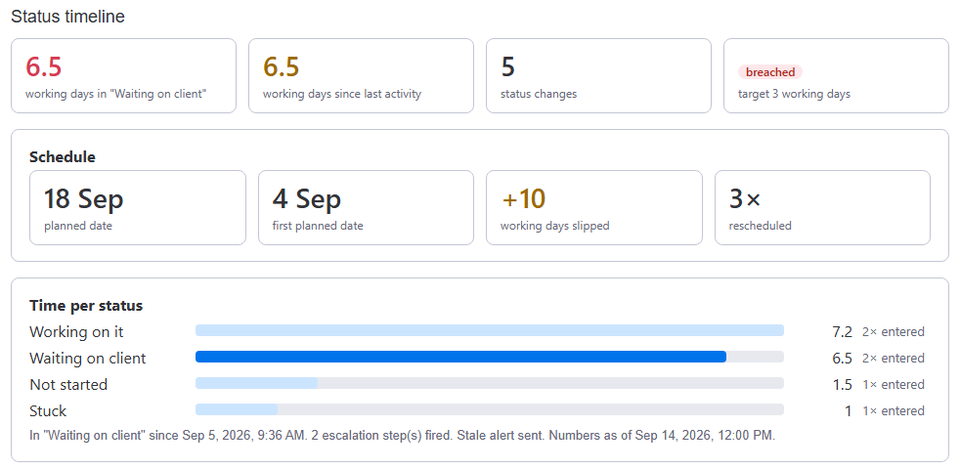
Time in status comes from the status changes themselves, so nobody has to remember anything. It answers questions like: how long do approvals take, how long does work wait for the customer, which stage holds items longest.
When you need both
An item worked on for two hours that took nine days to close spent most of its life waiting. Time tracking shows the two hours. Time in status shows where the nine days went.
How Stale & SLA fits in
Stale & SLA writes Days in current status, Days since last activity and a Total days column per tracked status as ordinary numbers columns, next to your Time Tracking column. It never touches the Time Tracking column.
Frequently asked
- Can I chart both on one dashboard?
- Yes. Both are columns on the board, so monday.com's own dashboard widgets can show them side by side.
Stale & SLA adds time in status, stale alerts, SLA targets and escalations to any monday.com board. Set-up takes about two minutes per board.