Guides · Updated 24 Sep 2026
Find stale items on a monday.com board before they are forgotten
A stale item is one nobody has touched in a while: no status change, no column edit, no update. It is not the same as overdue. An item with no due date can never be overdue, and can still sit untouched for a month.
The short answer
You can add a Last updated column and sort by it, and that works when someone remembers to look. For a check that runs by itself, count the days since each item's last real activity and get told once when an item crosses a threshold.
The manual sweep
A Last updated column shows when an item last changed and who changed it. Sorting or filtering by it finds the quiet items, as long as someone does the sweep every week, on every board.
It also moves with every change, including the ones integrations and apps write. If a tool writes to your items every day, Last updated stops meaning that a person looked.
What a stale check needs
- A threshold per board: two days on a support board, a week in a sales pipeline.
- Only the statuses that matter: finished items should stay quiet.
- One alert per quiet stretch, not the same alert every morning.
How Stale & SLA does it
Stale & SLA writes Days since last activity on every item, from the board's activity log: a status change, a column edit or the item's creation. The app's own column writes never count, so its daily numbers do not make items look fresh.
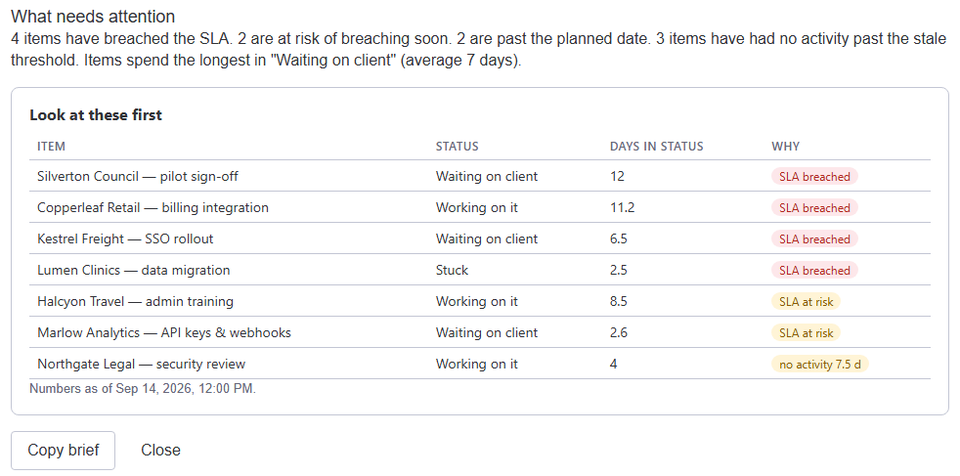
Set a stale threshold in the board's settings, and the trigger When an item has had no activity for N days fires once per quiet stretch, in the statuses you choose, then re-arms when someone touches the item. The weekly digest lists stale items with the rest of what needs attention.
Frequently asked
- What counts as activity?
- A status change, a column edit or the item's creation, read from the board's activity log. The app's own writes never count.
- What about very old items?
- Items with nothing in the last 120 days of the activity log are counted from their last known change, and the item view marks the value as a minimum.
- Can finished items go stale?
- No. The Stale check column in the board's settings says which statuses are checked, so Done items stay quiet.
Stale & SLA adds time in status, stale alerts, SLA targets and escalations to any monday.com board. Set-up takes about two minutes per board.