Guides · Updated 24 Sep 2026
Time in Status alternatives for monday.com
Time in Status by SaaSJet is the most installed time-in-status app for monday.com. If you need something it does not focus on, such as alerts for items nobody touched, SLA escalations, Kanban flow charts or automations that fire after a set time in a status, there are real alternatives. Here are six, ours among them, compared from their own marketplace listings.
The short answer
For SLA targets with escalations, and alerts for items nobody has touched: Stale & SLA. For response and resolution clocks with calendars and SLA reports: SLA by evolu. For Kanban flow charts: Flow Metrics. For automations that fire after a set time in a status: TICK. For SLA time in business hours written to number columns: WorkWindow SLA. For plain time-in-status reports: Cycle Time Tracker.
Why teams look beyond Time in Status
Time in Status reports how long work spends in each stage, with charts by person, team or board. Teams usually look further when the question changes: not how long work took, but which items are stuck right now, which will miss a promise, and who should be told.
What to compare
- Where the numbers live: board columns you can sort, filter and automate on, or reports in the app's own view.
- Working time: whether time counts only in your working hours, without your holidays.
- When a target slips: a color on the board, a notification, or an escalation that climbs.
- Price as you grow: most of these apps charge by the number of users in the monday.com account.
At a glance
| App | Best for | Installs | Pricing |
|---|---|---|---|
| Stale & SLA | SLA targets per status, an escalation ladder, alerts for items nobody touched | New: in monday.com's review | Free during launch |
| SLA by evolu | Response and resolution clocks with calendars, pause and resume, SLA reports | About 300 | Free plan to 49 users; Plus from $3 a month |
| Flow Metrics | Kanban charts: cumulative flow, aging work in progress, cycle-time histogram | About 40 | Free plan available |
| TICK | Automations that fire after a set time in a status | About 10 | Paid plans, 14-day trial |
| WorkWindow SLA | SLA time in business hours, written to number columns | A few | Free plan with one tracker |
| Cycle Time Tracker | Time-in-status reports, cycle and lead time | A few | Free |
Each alternative
Stale & SLA
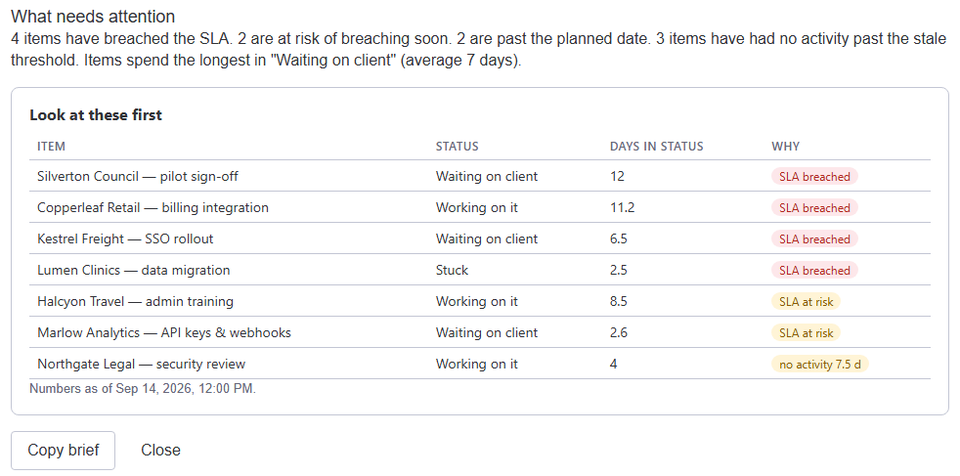
Writes Days in current status, Days since last activity and a total per status into numbers columns on every item. A target per status marks items at risk once 80% of it is used and breached after it, with an automation trigger for each and an escalation ladder that notifies a people column. A stale threshold catches items nobody has touched, and each board can count only its own work days, working hours and holidays.
SLA by evolu
Response and resolution clocks that board automations start, pause, resume and stop, with goals chosen by conditions such as priority. Several calendars with shifts and days off, reports of SLAs met and overdue, and time in status as dotted and stacked charts. It carries monday.com's security badge.
Flow Metrics
Turns a board's status history into Kanban reports: a cumulative flow diagram, an aging work-in-progress chart, a cycle-time histogram with confidence levels, simulations of when items will be done, and a process behavior chart, exportable as a PDF. It carries monday.com's security badge.
TICK
Adds an automation trigger based on time in status: while an item stays in a status, configurable time stages fire actions within minutes, for up to two weeks. It suits escalations and moving stuck items along.
WorkWindow SLA
Counts SLA time only in business hours, with time-zone-aware windows, holiday calendars and several windows a day. It writes elapsed business time to number columns, runs several trackers per board, shows which windows counted for each item, and has a trigger when an SLA breaches a threshold.
Cycle Time Tracker
Reports of time in each status, cycle and lead time, bottlenecks and trends over time, without manual tracking.
Which one to pick
- Items stuck and nobody told: Stale & SLA.
- A service desk with response and resolution SLAs: SLA by evolu or WorkWindow SLA.
- Kanban teams planning delivery dates: Flow Metrics.
- An action after N hours in a status: TICK.
- Reports of time per stage, by person or team: Time in Status itself.
Details of other apps come from their monday.com marketplace listings and, for Time in Status and SLA by evolu, their public documentation, read in September 2026; install counts change daily. Stale & SLA details describe the live app. TrueCrane is not affiliated with any of these developers.
Frequently asked
- Which of these apps are free?
- Stale & SLA is free during its launch. SLA by evolu has a free plan for up to 49 users, Flow Metrics and WorkWindow SLA have free plans, and Cycle Time Tracker is free, according to their listings. Time in Status and TICK are paid after a trial.
- Can two of them run on one board?
- Yes. Each writes its own columns or shows its own view. Stale & SLA writes only the numbers columns it creates.
- Which ones carry monday.com's security badge?
- SLA by evolu and Flow Metrics, according to their listings in September 2026.
Stale & SLA adds time in status, stale alerts, SLA targets and escalations to any monday.com board. Set-up takes about two minutes per board.