Guides · Updated 6 Oct 2026
Stale & SLA vs evolu SLA for monday.com
SLA by evolu is one of the most complete SLA apps on the monday.com marketplace: response and resolution clocks, calendars with shifts, and SLA reports. Stale & SLA takes a lighter route: a target for each status, set in the board's settings, with alerts and escalations when an item slips or goes quiet. This page compares the two from their own documentation.
The short answer
Choose evolu SLA for response and resolution clocks that you start, pause and stop with board automations, several calendars with shifts, and reports of SLAs met and missed. Choose Stale & SLA for a target on each status with no automation to build, a warning before the target passes, an escalation ladder, and alerts for items nobody has touched.
Side by side
| evolu SLA | Stale & SLA | |
|---|---|---|
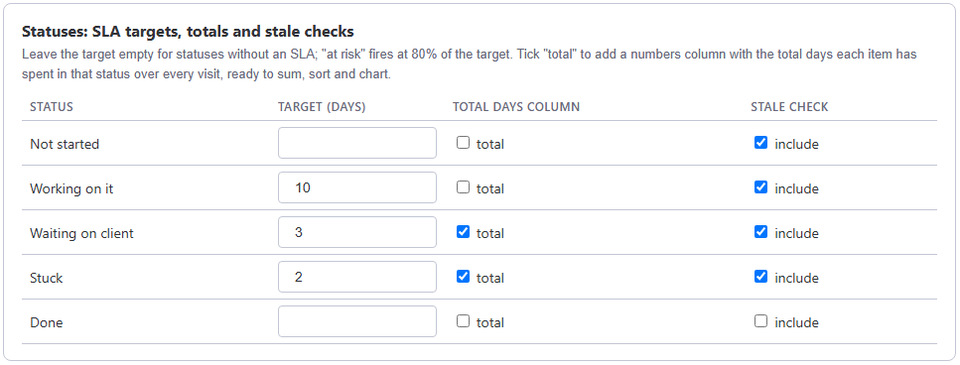
| How an SLA starts | Board automations start, pause, resume, stop and restart each SLA, with goals chosen by conditions such as priority | A target for each status in the board settings; the clock follows status changes on its own |
| Working time | Several calendars: time zone, collections of days off, working days, and several shifts a day | A calendar per board: work days, working hours, time zone and holidays |
| Warnings | Live status of each SLA, met or overdue, and a due-date countdown widget | At risk once 80% of the target is used, then breached, each with an automation trigger |
| When an SLA slips | Its SLA values can feed monday.com actions, such as a Send email | An escalation ladder that notifies a people column, step by step, while nothing moves |
| Reports | SLAs met and overdue, SLA durations, and time in status as dotted and stacked charts | A dashboard widget (open, stale, breached and at-risk counts, days in status in buckets, the oldest items) and a weekly digest |
| Items nobody touched | Measures SLA time and time in status | Days since any activity on the item, a stale threshold, and a trigger after N quiet days |
| Price | Free to start, then priced by account size: $3 a month for up to 5 seats and $5 for up to 10, every feature in each tier (pricing tab of its monday.com listing, October 2026). Its documentation also describes a free plan for up to 49 users, which the pricing tab does not show | Free during launch, with every feature |
| Trust | monday.com's security badge | Runs only on monday.com's own hosting, in the EU |
evolu SLA details come from its monday.com marketplace listing and its public documentation, read in September 2026 (prices checked on that listing on 6 October 2026), and may have changed since. Stale & SLA details describe the live app. SLA is a product of evolu; TrueCrane is not affiliated with it.
When evolu SLA fits better
- You run response and resolution clocks that pause while you wait for a customer.
- Different customers, offices or teams need their own calendars, or your day has several shifts.
- You report on SLAs met and missed over time.
When Stale & SLA fits better
- Your SLA is a time limit per status, and you would rather set a number than build automations.
- You want a warning before the target passes, and an escalation that climbs step by step while nothing moves.
- Your problem is items that nobody has touched, not only items that are late.
- You want the numbers in ordinary numbers columns you can sort, sum and filter.
Switching, or running both
There is nothing to move. Stale & SLA reads each board's activity log, so items that existed before you installed it get their numbers too. It writes only the numbers columns it creates, so it can run next to evolu SLA on the same board while you compare.
Frequently asked
- Can I try Stale & SLA without installing it?
- Yes. The demo runs the app's real views on a sample board in your browser, with no monday.com account.
- Can Stale & SLA pause the clock while we wait for a customer?
- Its targets are per status, so a status such as Waiting on customer can simply have no target.
- Where does Stale & SLA keep my data?
- On monday.com's own hosting, in the EU. The security page has the details.
Stale & SLA adds time in status, stale alerts, SLA targets and escalations to any monday.com board. Set-up is one status column and a Save on each board.
Stale & SLA is in review for the monday.com Marketplace. Until monday.com approves the listing, the install screen says the app has not been reviewed yet. How it handles your data.