Guides · Updated 24 Sep 2026
SLA tracking on monday.com: a target for each status
An SLA on a board is a promise about time: new requests are picked up within a working day, approvals take no more than two. The clock starts when an item enters a status and stops when it leaves.
The short answer
A due date cannot express an SLA, because the target belongs to the status, not to the item, and it restarts at every move. What you need is a target per status, a warning before it passes, and working-time counting if your team keeps business hours.
Why a due date is not an SLA
A due date is one fixed day per item. An SLA is a rule per status that applies to every item that enters it and restarts when the item moves on. Setting a date by hand for each item, and moving it every time the status changes, is the part that breaks.
What good SLA tracking needs
- A target for each status that has one, and none for statuses such as Waiting on customer.
- A warning before the target passes, not only after.
- Counting in working time when the team works business hours, so a Friday-evening request is not late on Monday morning.
- Someone who is told when a target does pass.
How Stale & SLA does it
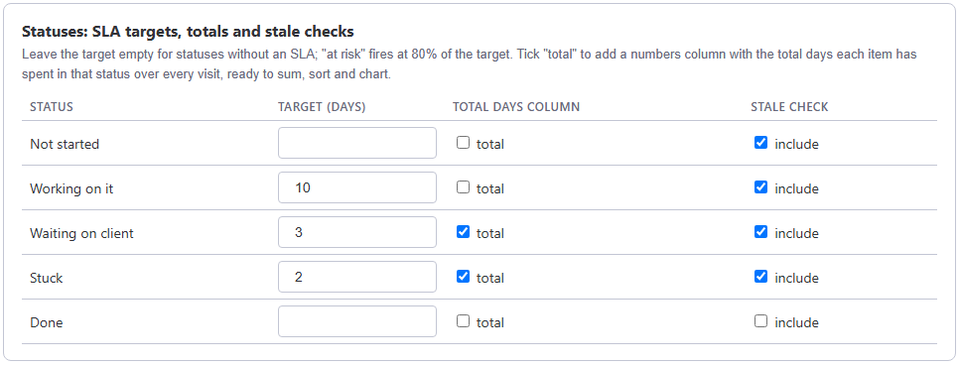
In the board's Stale & SLA settings you set an SLA target, in days, for each status that has one. With business hours on, two days means two working days of the board's calendar. Each item then has an SLA state: ok, at risk (80% of its target used up) or breached.
Two automation triggers, When an item is at risk of missing its SLA and When an item breaches its SLA, connect to monday.com's own actions, so you can notify someone. The template When an item breaches its SLA, escalate it to a people column notifies everyone in the item's chosen people column and posts an update on the item. An escalation ladder in the settings can add further steps after more days.
The SLA & aging dashboard widget counts the board's items by SLA state, and What needs attention, opened from the board header, lists the breached and at-risk items first.
Frequently asked
- Does the clock run while we wait for the customer?
- Only in statuses that have a target. Leave Waiting on customer without one and time there never breaches.
- Which boards does it work on?
- Any monday.com board with a status column.
- How often is the SLA state checked?
- At least once a day for every board, and right away when an admin clicks Save & run now.
Stale & SLA adds time in status, stale alerts, SLA targets and escalations to any monday.com board. Set-up takes about two minutes per board.