Guides · Updated 24 Sep 2026
Find and escalate overdue items on monday.com
An overdue item is one whose planned date has passed while it is still open. The harder question is the one a date column cannot answer: how far has this date moved since it was first set?
The short answer
monday.com automations can notify someone when a date arrives, and a filter on the date column shows what is late today. What is missing is the history: the first planned date, how often the date was moved, and one list of everything late on the board.
What monday.com covers
A date or timeline column holds today's plan, and automations can notify someone when that date arrives. That covers the day of the deadline.
What it does not keep
- The first planned date. A date moved from the 1st to the 20th does not look late on the 19th.
- How often it moved. An item rescheduled four times is a different problem from one that slipped once.
- One list of what is late, next to what is stuck and what went quiet, worst first.
How Stale & SLA does it
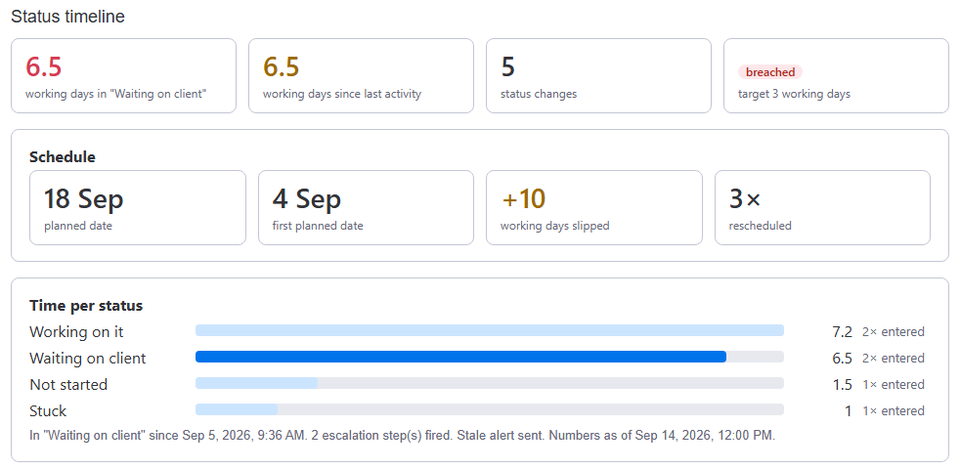
Choose the board's date or timeline column in the Stale & SLA settings. The app reads that column's history from the activity log and writes two numbers on every item: Days slipped, today's planned date against the first planned date the item ever had, and Times rescheduled.
The trigger When an item's planned date slips N days or more fires once per item and first planned date, and connects to monday.com's own notify actions. The SLA & aging widget adds a Schedule block: overdue items, items that slipped past their first date, items rescheduled twice or more, the average slip, and the worst of them. What needs attention, opened from the board header, puts overdue items next to the breached, at-risk and stale ones.
Frequently asked
- Does pulling a date in count?
- Days slipped goes negative when a date is pulled in. Times rescheduled counts every change after the first date was set.
- Does it work with a timeline column?
- Yes. It follows the timeline's end date.
- Are weekends counted in the slip?
- In calendar mode, yes. With business hours on, the slip is in working days.
Stale & SLA adds time in status, stale alerts, SLA targets and escalations to any monday.com board. Set-up takes about two minutes per board.