Guides · Updated 24 Sep 2026
Aging report on monday.com: which open items are getting old
An aging report shows how long open items have been sitting where they are. It catches the work a due-date filter misses: items with no date at all, and items that have waited in one status for weeks.
The short answer
monday.com can filter by due date, but it has no built-in view of how long open items have sat in their current status. Put that number on every item as a numbers column, then count the items in age buckets and list the oldest first.
What a due-date filter misses
An overdue filter sees only items that have a date, and only once the date has passed. An item created without a due date, or one waiting in Waiting on client for three weeks with its date still ahead, never shows up.
What to look at
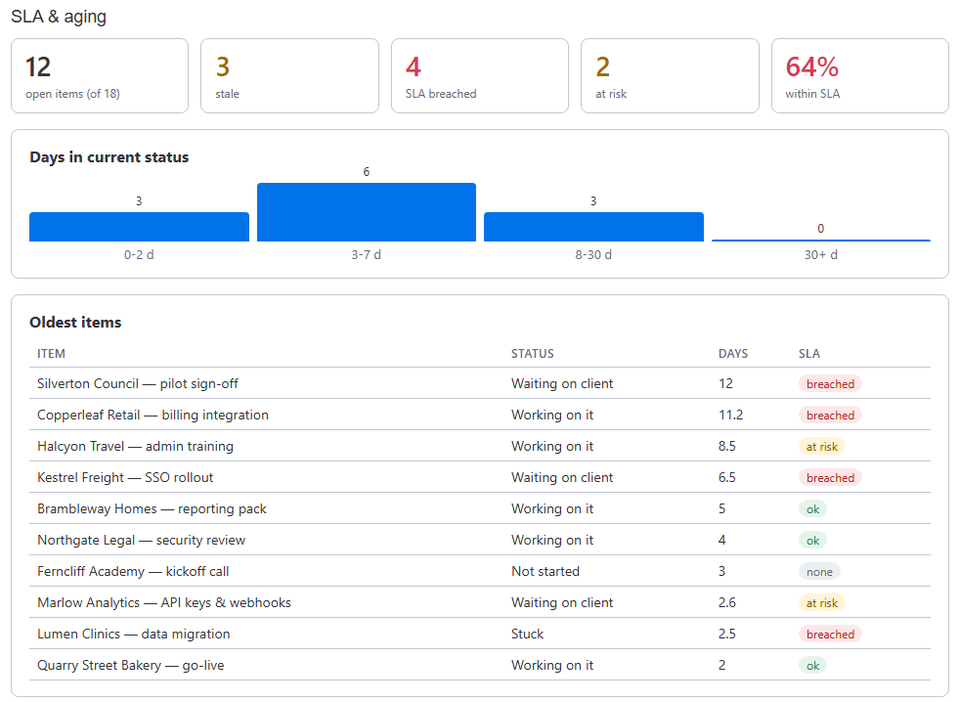
- Age buckets: how many open items have been in their current status for 0-2 days, 3-7, 8-30 and over 30. A growing last bucket means work is piling up.
- The oldest items: a short list, oldest first, with each item's status and SLA state.
- Average days by status: which stage holds items longest.
How Stale & SLA does it
Stale & SLA writes Days in current status on every item as a numbers column, from the board's activity log, so you can sort, filter and chart it with monday.com's own tools. The SLA & aging dashboard widget turns it into an aging report: the open items in the four age buckets, the oldest items with their status and SLA state, and the average days by status. Finished items stay out of the aging numbers and count toward cycle time instead.
With business hours on, the days are working days of the board's calendar, so a long weekend does not make every item look older.
Frequently asked
- Which items count?
- Open items only. Items in the statuses you leave out of the stale check in the board's settings, such as Done, stay out of the aging numbers.
- Is it the days since creation or since the last status change?
- The days in the current status: since the item last moved. The Status timeline item view shows its whole path, and Days since last activity counts any change at all.
- Can I build my own chart?
- Yes. Days in current status is an ordinary numbers column, so monday.com's chart and battery widgets can group and average it.
Stale & SLA adds time in status, stale alerts, SLA targets and escalations to any monday.com board. Set-up takes about two minutes per board.