Guides · Updated 24 Sep 2026
A weekly board digest on monday.com instead of manual check-ins
Most weekly check-ins re-read the board to answer the same questions: what is late, what is stuck, what did nobody touch. The board already knows.
The short answer
A digest should arrive on the same day and hour every week, lead with the counts, and list only the few items that need a person, in order of urgency: SLA breached, then at risk, stale, overdue and slipped.
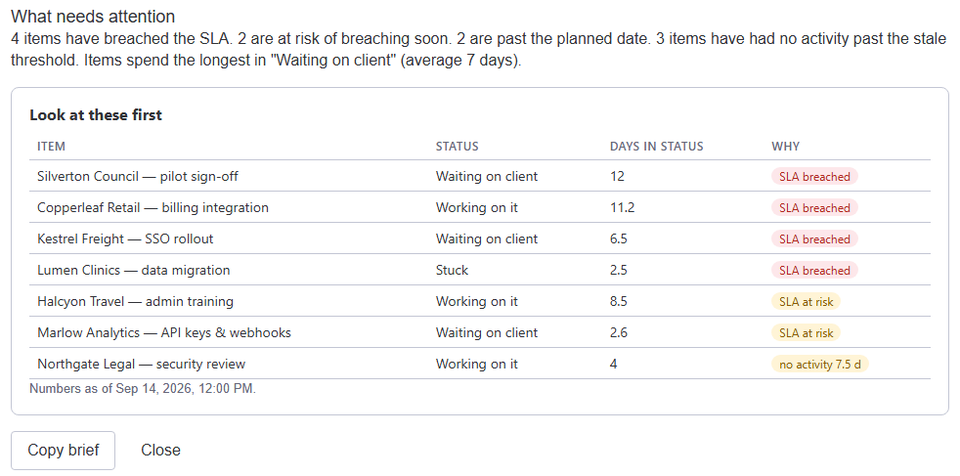
What belongs in it
- A headline with the counts, so a quiet week takes five seconds to read.
- The most urgent items first, with why each is listed.
- Nothing that needs no action.
How Stale & SLA does it
In the board's Stale & SLA settings, an account admin switches on Send it to me under Weekly digest and picks the weekday and hour. Each week they get one monday.com notification: a headline with the counts and the five most urgent items. Preview this week's digest shows the full text, and Save & send it to me now sends a test copy.
To send it to someone else, use the template When the weekly digest is ready, notify someone. The trigger carries the full text and every count, so it can feed any monday.com action.
Frequently asked
- Who can switch it on?
- Each account admin opts in for themselves. Members and guests can receive it through the automation template.
- What if nothing needs attention?
- The headline says so, and the list is empty.
Stale & SLA adds time in status, stale alerts, SLA targets and escalations to any monday.com board. Set-up takes about two minutes per board.