Guides · Updated 24 Sep 2026
Stale & SLA for monday.com partners
You build service desks, operations trackers and approval flows on monday.com for your clients. Stale & SLA adds the part clients ask about after go-live: which items are stuck, which promises are about to slip, and who should hear about it. It sets up per board in minutes and is free, with every feature, while it launches.
The short answer
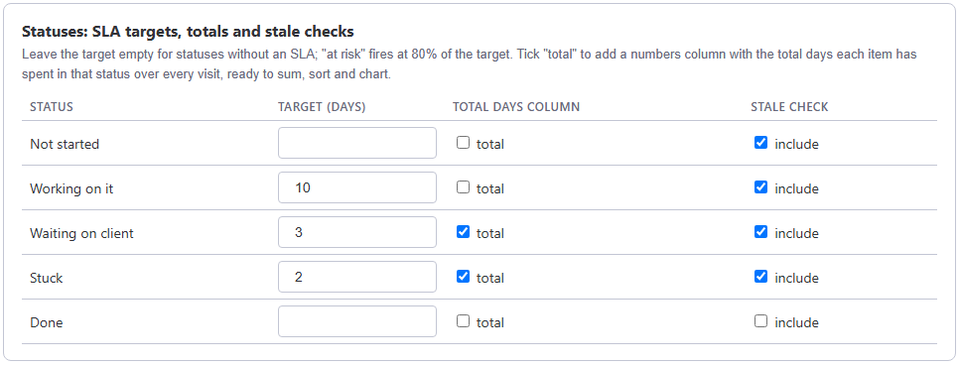
Stale & SLA reads each board's activity log and writes numbers columns your client can see, sort and automate on: days in the current status, days since the last activity, and a total per status. Give each status an SLA target in working days, and items turn at risk at 80% of it and breached after it, with automation triggers and a step-by-step escalation to a people column.
What your client gets
- Days in current status, days since last activity and a total per status, as numbers columns on every item.
- An SLA target per status, counted in the board's working days, hours and holidays; statuses such as Waiting on customer can have no target.
- Automation triggers for stale items, at-risk SLAs and breached SLAs, and an escalation ladder that notifies a people column step by step while nothing moves.
- An item view with the status timeline, a dashboard widget with open, stale, breached and at-risk counts, and a weekly digest.
Setting it up for a client
- An admin of the client's monday.com account installs Stale & SLA.
- On each board, open the app's settings, pick the status column, and set a target for the statuses that have one.
- Add the automations your client wants, for example notify the owner when an item turns at risk.
There is nothing to import. Items that existed before the install get their numbers from the activity log, so the client sees history on day one, which makes a good hand-over demo.
What it touches
Stale & SLA writes only the numbers columns it creates and leaves every other column alone, so it sits next to the automations and integrations you already built. It runs on monday.com's own hosting in the EU, and an account's data and access token are deleted when the app is uninstalled. The security page lists what it reads and stores.
Price and support
Free during launch, with every feature. Questions about a client setup go to [email protected], answered within two business days.
Frequently asked
- Who installs it on a client's account?
- An admin of that monday.com account. The app then works on any board where it is set up.
- Can clients try it before installing?
- Yes. The demo runs the app's real views on a sample board in the browser, with no monday.com account.
- Is TrueCrane a monday.com partner?
- No. TrueCrane is an independent developer of apps for the monday.com marketplace and is not affiliated with monday.com.
Stale & SLA adds time in status, stale alerts, SLA targets and escalations to any monday.com board. Set-up takes about two minutes per board.
Stale & SLA is in review for the monday.com Marketplace. Until monday.com approves the listing, the install screen says the app has not been reviewed yet. How it handles your data.